
How ThinkRows Helps You Make Sense of Your Spreadsheets
ThinkRows is built for the awkward stage between receiving a spreadsheet and trusting it for analysis: it identifies usable tables, maps fields and relationships, checks what the data can answer, and supports reviewable transformations.
Updated May 24, 2026
Key Takeaways
- Upload workbooks in their raw form instead of manually rebuilding them before inspection.
- Review identified tables, mapped columns, and entity relationships before relying on the data.
- Check which business questions are answerable, partial, or missing necessary inputs.
- Request and review transformations such as joins, renames, calculations, sorting, and clean exports.
Why is a messy spreadsheet hard to trust?
A workbook can look usable while still being difficult to analyze. Important tables may sit beside notes, titles, subtotal rows, or other tables on the same sheet. Column names may be abbreviated, business keys may be unclear, and the question you need to answer may require data that is not present.
The costly part is often not writing a formula. It is working out what the workbook contains, whether the tables connect, and which cleanup steps are safe to repeat. ThinkRows is designed for that inspection and preparation work.
- Exports containing several usable tables across multiple sheets.
- Headers and field names that need interpretation before modeling.
- Questions that depend on relationships between customer, order, invoice, or revenue data.
- Transformations that should be reviewed before a new workbook is downloaded.
What does ThinkRows do?
ThinkRows accepts raw spreadsheet uploads and identifies structured table regions inside them. The workflow then exposes column mappings and inferred business meaning so an analyst can review how the source has been interpreted.
Once tables have been understood, ThinkRows can show a dataset overview, represent entity relationships when available, and assess questions against the data. A result can be answerable, partial, or not answerable with the current input, which is more useful than assuming every workbook supports every requested conclusion.
How does the workflow move from upload to insight?
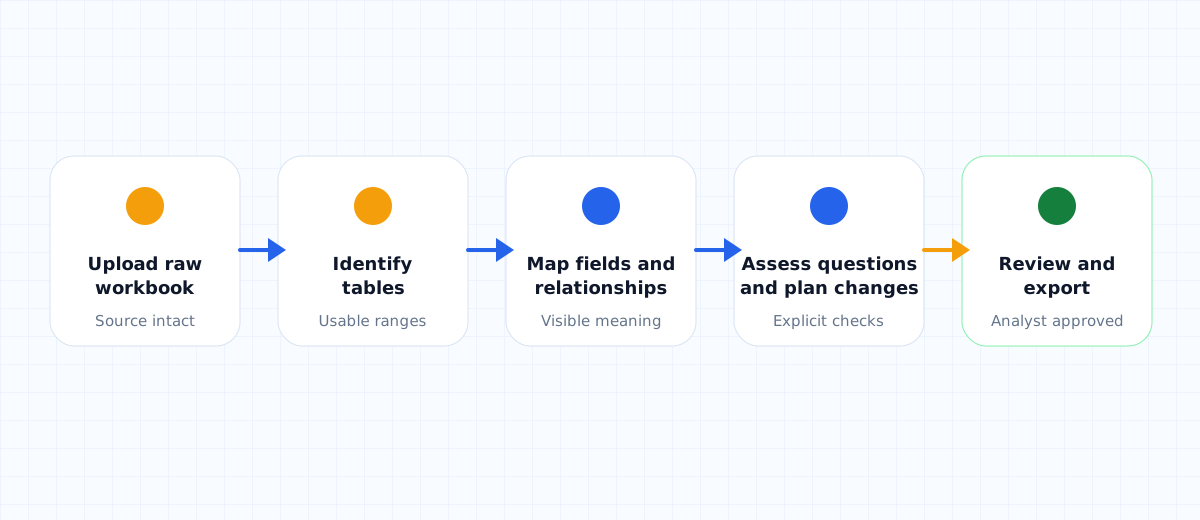
Start with the workbook as received. ThinkRows detects usable tables, profiles columns, and presents mappings for review. If clarification is required, the workflow pauses for those answers before producing a report rather than hiding uncertainty.
The report brings together dataset coverage, question verdicts, data statistics, column mapping, and entity relationships when identified. This makes the intermediate reasoning visible before an analyst exports data or asks for a transformed version.
- Upload raw sheets without creating a cleaned duplicate first.
- Inspect detected tables and mapped columns.
- Answer clarification questions where interpretation is ambiguous.
- Review the report and the questions the dataset can support.
- Move into transformation only after the dataset is understood.
Which transformations can analysts prepare?
After review, an analyst can describe the final spreadsheet they need. The current transformation workflow supports joining tables through matching identifiers, selecting and reordering columns, renaming fields, adding calculated columns, aggregating matched numeric columns, and sorting the result.
The output is not meant to be accepted blindly. ThinkRows generates a transformation plan and preview for review, then provides a downloadable workbook after an approved transformation is executed. That keeps the analyst in control of the output used downstream.
Who is ThinkRows for?
ThinkRows is aimed at people who regularly receive spreadsheets that were not designed as clean data sources: business analysts assembling management answers, BI specialists preparing model inputs, data analysts checking exports, and data scientists doing an initial review before deeper work.
It is most useful when the first question is not yet “Which chart should I build?” but “What is actually in this workbook, what can it support, and what must change before I use it?”
What should still be checked by an analyst?
ThinkRows supports interpretation and transformation; it does not remove the need for validation. Before sharing a report or using transformed data in a decision, check critical identifiers, totals, missing fields, join assumptions, and any calculation that carries business meaning.
That division of responsibility is deliberate. The tool helps expose structure and prepare work faster; the analyst remains responsible for confirming that the final dataset matches the business context.
ThinkRows workflow at a glance
| Stage | What ThinkRows provides | What the analyst checks |
|---|---|---|
| Upload | Raw workbook intake | Correct files and intended questions |
| Identify | Detected tables and mapped columns | Headers, keys, and missing context |
| Assess | Overview, relationships, and question verdicts | Whether evidence supports each question |
| Transform | Plan, preview, and downloadable workbook | Joins, calculations, totals, and output shape |
Frequently Asked Questions
What types of spreadsheet problems is ThinkRows meant to solve?
ThinkRows is meant for raw or awkward workbooks where the useful tables, field meanings, relationships, or required cleanup are not immediately obvious. It helps an analyst understand the source before building reports or transforming the data.
Does ThinkRows automatically decide whether a dataset answers a business question?
ThinkRows produces question verdicts based on the detected dataset and any clarification provided. Those verdicts help organize review, but an analyst should still validate important assumptions and business-critical outputs before relying on them.
Can ThinkRows produce a transformed Excel workbook?
Yes. After a dataset is understood, the transformation workflow can prepare and review operations such as joins, selected columns, renames, calculations, numeric aggregation, and sorting, then provide a downloadable workbook for an approved transformation.